Red Gradient Side-Print Shine-Through PBT Keycaps Guide
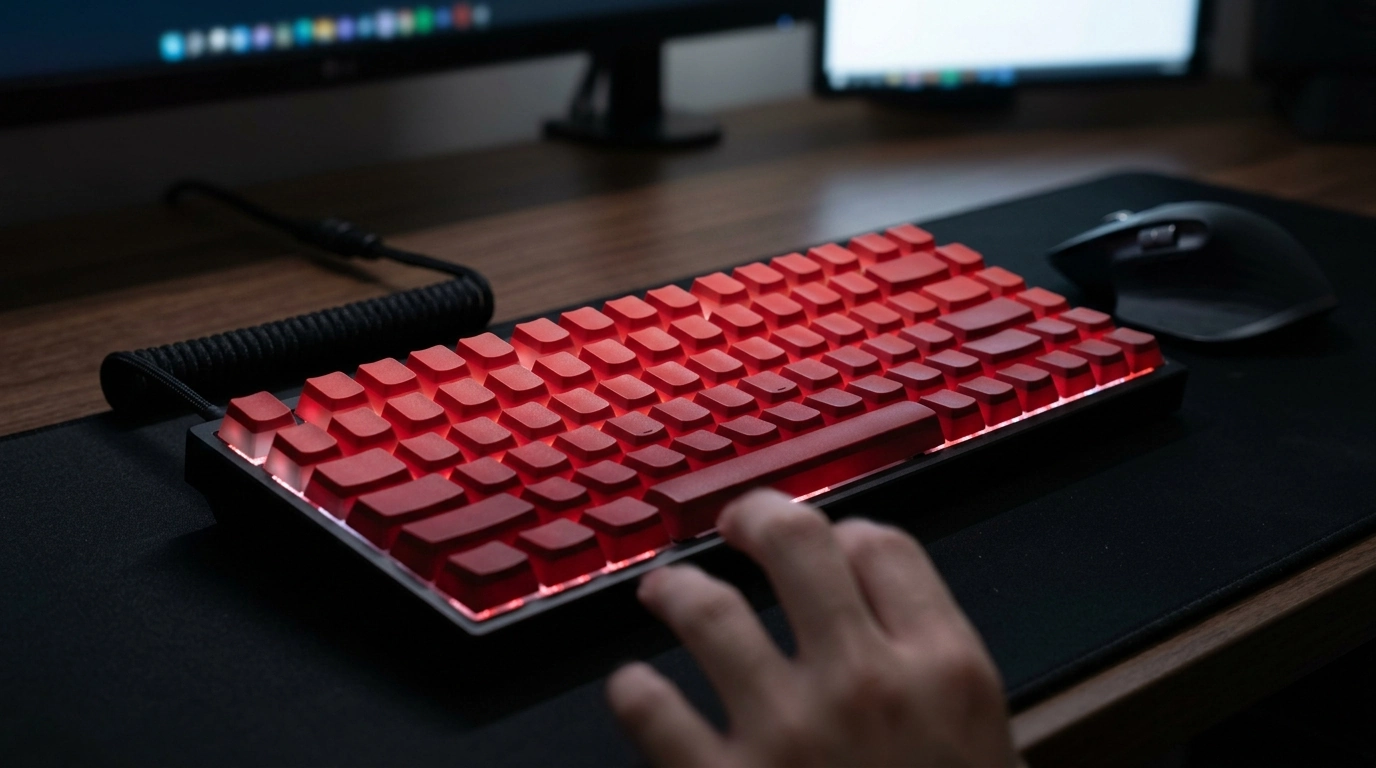
Red Gradient Side-Printed Shine-Through PBT Keycaps (Cherry Profile): What to Expect
A red gradient set with side-printed legends and shine-through lighting can transform both the look and night-time usability of a mechanical keyboard. This guide breaks down fit, feel, lighting results, and compatibility details so the set performs as good as it looks—especially if you’re aiming for a clean top surface with backlighting that still does real work after dark. For more guidance, see Side Print Pbt Cherry Black 136 Key ….
Design highlights: gradient color, side print, and backlighting
The first thing noticed on a red gradient set is the way color transitions row-to-row. Instead of a flat single shade, the board gains depth: darker reds can anchor the bottom rows while brighter tones pop near the top, creating a cohesive, high-contrast build that still feels intentional. For further reading, see Cherry Mx Red Keycap 115 Keys Red Transparent Clear ….
Side-printed legends keep the keycap tops visually uncluttered, which pairs well with minimalist desk setups and boards that already have standout cases or artisan accents. From a normal typing angle, the legends remain readable without dominating the overall look.
Because these legends are shine-through, the expectation is simple: when per-key LEDs are on, characters should light up for low-light use. Results can vary based on how your keyboard places and diffuses light. Many users see the best visual effect with north-facing lighting or boards with strong diffusion—though south-facing LEDs can still look good depending on the keycap’s legend placement and the brightness of your RGB implementation.
Material and feel: PBT for daily use
PBT is a common choice for everyday keycaps because it tends to resist developing that slick, polished shine that can appear on many plastics over time. For heavy typists and gamers, that matters: the surface stays more consistent in feel session after session.
Texture is typically more matte and lightly grippy, helping with controlled finger placement during long workdays or competitive play. PBT also has strong color stability, which helps a multi-tone gradient keep its contrast when paired with routine cleaning.
With shine-through sets, brightness isn’t only about your LED strength—it’s also influenced by how the legend is made and how much light the surrounding plastic blocks or diffuses. If you prefer very bright, crisp legends, plan to run higher brightness or lighter LED colors.
Profile and comfort: Cherry profile typing experience
Compatibility checklist before buying
Before purchasing any keycap set, confirm two things: physical fit on the switch stem and layout coverage for your specific keyboard. Most modern mechanical boards use MX-style “plus” stems, but it’s always worth verifying in your keyboard’s specs (or by pulling a cap and checking the stem shape). You can also reference the switch maker’s documentation, such as the official Cherry MX switch page, to understand common stem standards.
Quick fit and lighting checklist
| What to check | Why it matters | How to confirm |
|---|---|---|
| Switch stem type (MX-style) | Ensures the keycaps physically mount to switches | Look for a “+” stem on the switch or confirm in keyboard specs |
| Keyboard layout (60/65/75/TKL/Full-size) | Determines which key sizes are required | Compare your layout to your current keycap set or product diagrams |
| Bottom-row sizes (Ctrl/Win/Alt/Space) | Non-standard rows may not match included modifiers | Measure or check manufacturer layout notes |
| LED orientation and diffusion | Affects brightness and readability of shine-through legends | Check photos of your board with backlight on; note LED position |
| Stabilizer compatibility (Cherry-style) | Large keys rely on stabilizers for smooth travel | Most modern boards use Cherry-style stabilizers; verify if unsure |
If you want to compare profiles before committing, the Deskthority keycap profile reference is a helpful visual guide for understanding row sculpt and overall height differences.
Lighting results: what “shine-through” looks like in real use
Sound and build: how keycaps influence acoustics
Care and cleaning to keep the gradient crisp
With the caps off, it’s a good time to check for debris around switches and stabilizers. A small amount of grit can change feel and sound, and keeping the plate area clean helps the keyboard feel consistent over time. If you’d like more background on the material itself, PBT (polybutylene terephthalate) is widely used in durable consumer products due to its stability and resistance characteristics.
Product options in stock
- Red Gradient Side-Printed Shine Through Keycaps Cherry Profile PBT ($46.51) – Red gradient styling, side-printed legends, shine-through lighting support, Cherry profile, and PBT construction.
- 90 Degree USB Type C Cable 3A 60W Fast Charger for iPhone, Samsung, Xiaomi ($2.51) – A right-angle cable can reduce strain and keep a cleaner look for wired keyboards and desk setups.
- Wired Noise Cancelling Gaming Earphones ($25.51) – A simple plug-in option for gaming or calls without relying on battery-powered audio.
FAQ
Will side-printed shine-through legends look as bright as top-printed legends?
Not always. Brightness depends on LED position, diffusion, and how the legend aligns with the light path; side legends can look a bit more directional and sometimes dimmer than top legends. Increasing brightness and using a lighter LED color usually improves readability.
Do Cherry profile keycaps fit any mechanical keyboard?
Cherry profile describes the keycap shape and height, but fit depends on having MX-style stems and the correct key sizes for your layout. Check bottom-row sizing and stabilized keys to ensure the set matches your board.
How can uneven backlighting or wobble on large keys be improved after installing new keycaps?
Start by reseating the keycap fully onto the switch stem and making sure stabilized keys are clipped in evenly on both sides. If wobble or uneven glow persists, verify stabilizer wire placement and consider stabilizer tuning (lubing and alignment) to smooth travel and reduce rattle.





Leave a comment