Foldable MagSafe-Style 3-in-1 Charger Stand (15W)

Foldable Magnetic 3-in-1 Wireless Charging Station – 15W Fast Charger for iPhone, Apple Watch, and AirPods
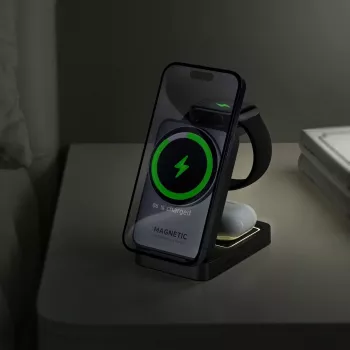
A foldable 3-in-1 charging station keeps an iPhone, Apple Watch, and AirPods powered from a single compact setup—ideal for nightstands, workspaces, and travel. Magnetic alignment helps reduce misplacement on the charging pad, while a fast-charging design aims to shorten daily top-ups without adding cable clutter.
What this 3-in-1 station is designed to do
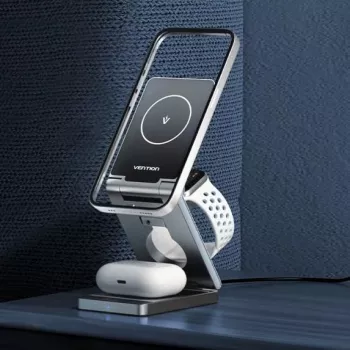
The Foldable Magnetic 3-in-1 Wireless Charging Station – 15W Fast Charger for iPhone, Apple Watch, and AirPods is built around one simple idea: keep the three Apple devices most people carry—phone, watch, and earbuds—in one organized charging spot.
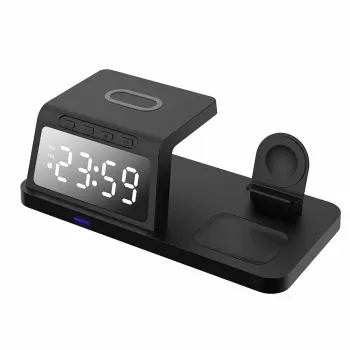
- Charge three Apple devices in one place: phone, watch, and earbuds case (compatible models depending on wireless support).
- Use magnetic alignment for the phone area to help center the coil and improve charging consistency.
- Fold into a smaller footprint for packing, then unfold into an angled stand for desk or bedside visibility.
- Reduce cable sprawl by replacing separate chargers with a single station and one power input.
Magnetic alignment is especially helpful for everyday use: instead of nudging the phone around until charging starts, the phone area is meant to “find” a consistent charging position with less trial and error. For background on how magnetic alignment works on compatible iPhones, Apple’s MagSafe overview is a useful reference: Apple Support — About MagSafe on iPhone.
Everyday setups: bedside, desk, and travel
A foldable design makes this station fit naturally into three common routines—overnight charging, at-a-glance desk use, and packing light for trips.
- Bedside: keep the phone visible for alarms/notifications while the watch and earbuds recharge overnight.
- Desk: use the angled phone position for video calls, timers, or focus modes while charging.
- Travel: fold the unit flat, pack one compact charger/cable, and create a consistent charging spot in hotels or at work.
- Shared spaces: reduce the chance of mixed-up cables when multiple Apple devices are in use.
Quick fit check for common use cases
| Use case | Best setup | What to watch for |
|---|---|---|
| Nightstand charging | Unfolded stand with phone angled toward you | Use a stable surface; avoid thick cases that can weaken magnetic hold |
| Work desk | Phone angled + watch dock accessible from the side | Keep metal items away from the phone magnet area |
| Travel bag | Folded flat with a short cable | Confirm the power adapter output is sufficient for multi-device charging |
| Minimalist setup | Single station replacing separate chargers | Expect slower charge when multiple devices are charging at once compared with plugging each into a dedicated fast charger |
Charging performance and what “15W” means in practice
“15W” typically refers to a peak output rating for the phone charging zone, not a guaranteed constant speed for every device and scenario. Real-world results vary based on device model, power adapter capability, wireless charging protocol support, and even ambient temperature.
- 15W is a peak rating for the phone charging zone; actual speed depends on phone model, adapter output, and charging protocol support.
- Wireless charging typically runs warmer than wired; a good magnetic alignment helps reduce wasted energy from coil misalignment.
- When charging multiple devices at the same time, total available power is shared—expect more gradual top-ups than single-device charging.
- For best results, pair with a quality power adapter (and cable) that can supply adequate wattage to the station.
Wireless charging standards are governed by the Qi ecosystem; for a technical overview of how Qi works and why alignment matters, see the Wireless Power Consortium — Qi Standard.
Compatibility notes to confirm before buying
3-in-1 chargers are most satisfying when every device “just works” the first time it touches down. Before choosing a station, it helps to confirm how each device charges today—MagSafe/Qi for iPhone, Apple Watch charging support, and whether your AirPods case is the wireless-charging version.
- iPhone: works best with MagSafe-compatible iPhones; other Qi-capable phones may charge but may not magnetically align.
- Apple Watch: designed for Apple Watch charging; confirm watch series compatibility if using older models.
- AirPods: requires a wireless-charging-capable AirPods case (or other Qi-capable earbuds case).
- Cases and accessories: thick cases, metal rings/plates, and pop-sockets can reduce charging efficiency or prevent a secure magnetic connection.
If you’re unsure about watch charging behaviors and placement, Apple’s guidance is a helpful baseline: Apple Support — Charge Apple Watch.
Foldable build, angles, and stability
Heat, safety, and charging etiquette
Getting the most reliable charge (setup checklist)
If your current cable is awkward at the nightstand edge or interferes with a compact setup, a right-angle option can help route power more neatly. Pairing the station with the 90 Degree USB Type C Cable 3A 60W Fast Charger for iPhone, Samsung, Xiaomi can also reduce strain where the cable meets the device or charger.
When this station is the right choice
FAQ
Will this charge through an iPhone case?
In many cases, yes—thin, non-metal cases tend to work best. Extra-thick cases or cases with metal plates/rings can weaken magnetic hold and reduce charging efficiency, so removing those accessories can help if charging seems inconsistent.
Can all three devices charge at the same time?
Yes, it’s designed to charge a phone, watch, and earbuds together. Charging speed can vary when multiple devices draw power at once, so using a strong wall adapter helps maintain steadier performance.
Why does wireless charging sometimes feel slower than a cable?
Wireless charging is generally less efficient than wired and can slow down when heat increases. Alignment, case thickness, and the quality of the power adapter also affect real-world charging speed.



Leave a comment